This covers data that can be encoded into text, there’s another one of these for photos.
Everything starts on Drafts, because it’s the best and the fastest tap-to-text around. It usually goes in by typing, sometimes from the clipboard and rarely via dictation. For the most part the input is on the go while doing or trying to focus on something else with makes it tricky.
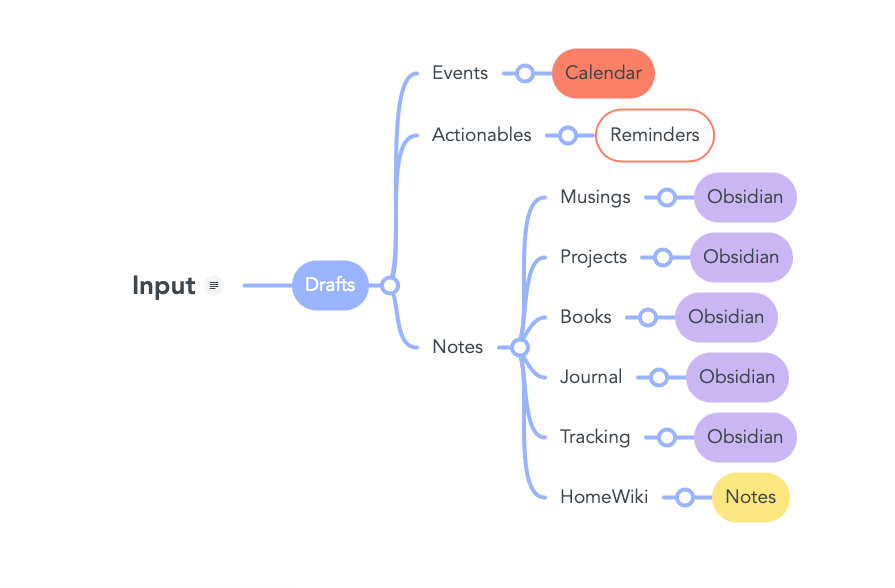
Once the text is Drafts, there’s a range of options. It can be sent to Reminders as a single reminder or as a ‘project’ with sub-tasks. You can add events through Fantastical, send notes, or interact with Obsidian, which is where text goes to rest.
It may seem like there are only three options, and for the most part, yes, any text is either a reminder that goes on the calendar, an actionable that goes as a task, or notes for ongoing projects. However, there’s a lot of gray area in the last bit, and it’s a constant battle between learning behaviors and habits to develop a better pipeline and organizational scheme and the desire to keep evolving and improving my habits and behaviors.
Calendar
Anything with a date goes in the calendar. After writing in Drafts, there’s an action that sends the same text to Fantastical, which is like a magician understanding that kind of speech.
Actionables / Tasks
Anything that ‘has to be done’ goes to the Reminders app. There are two main shortcuts for this, ‘Add Reminder’ and ‘Add Reminder Project’.
‘Add Reminder’ will create a reminder with the text from the draft and will show a list of tags to select from. Alternatively, it can pick them up from the draft itself, splitting the draft with a pipe like ‘|tag,tag,tag’.
‘Add Reminder Project’ is similar; however, this will also add as a sub-task anything below starting with a dash (-).
Musings
Musings are meant for anything that comes out of my brain—ideas, thoughts, etc. This may stay as a draft for a while with constant updates. Once it loses its importance, it goes to Obsidian as a general note. The action will pop up a list of tags to assign to this note.
Projects
Projects are for structured initiatives, whatever they may be. It starts with a project note, like a homepage of sorts, ideally containing some descriptions and intentions. This action will create a note in the Projects directory of Obsidian.
Any text or content supporting a project goes to ‘To Project’. This action will ask for a Project Note (showing all the notes in the Projects directory). Upon selecting a project, it will add a note to that project note with the date and a link to the new note, which is stored in the Projects/notes folder.
Book Notes
Book Notes are notes regarding books I read. A plugin in Obsidian fetches my book highlights from Kindle and creates a note for each book. Here, I can link the notes I write with the highlights from Kindle, making referencing any book highlight, note, or idea I had while reading it pretty easy.
Journal
Every morning, I attempt to write 1200 words. Studies show some benefits to writing every day, so there’s a little ecosystem of things to enhance the experience, like pre-filling templates, extracting tasks to reminders, or keeping track of various things.
These are a few of the protocols which will be broken down and elaborated on as we go.
 Webalab
Leave a comment