Managing reminders efficiently is crucial as they accumulate over time, potentially leading to storage issues. Even after completion, they linger, contributing to the storage footprint. To mitigate this, there’s a convenient shortcut: periodically moving completed reminders out of the application. This can involve either permanent deletion or archiving them in a text file along with pertinent metadata.
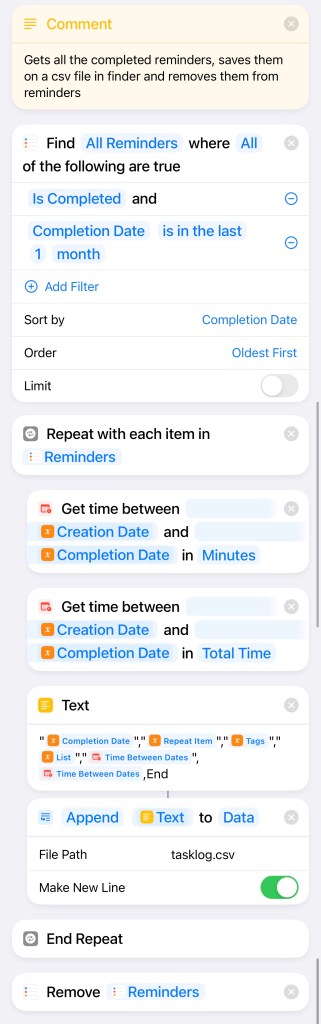
While storing a copy of the data doesn’t directly address the storage problem, it shifts it to the hard drive, which is more manageable. Moreover, this approach offers numerous advantages. For instance, storing the data in a CSV file enables various analyses, such as calculating the duration it took for each reminder to be completed and conducting other statistical assessments.
The frequency of triggering this process is flexible, depending on individual preferences. It can be initiated manually or set to run automatically at regular intervals. Personally, I find a monthly schedule to be reasonable, but longer intervals can also suffice. The determining factor is the time it takes to execute the process.
 Webalab
Leave a comment